Karaoke lyrics that follow your voice.
Pick any song, play the music from any app, and sing. SingScroll lights up each word as you sing it and scrolls with you, at your speed. No waiting for a karaoke version, no lyrics racing ahead of you.
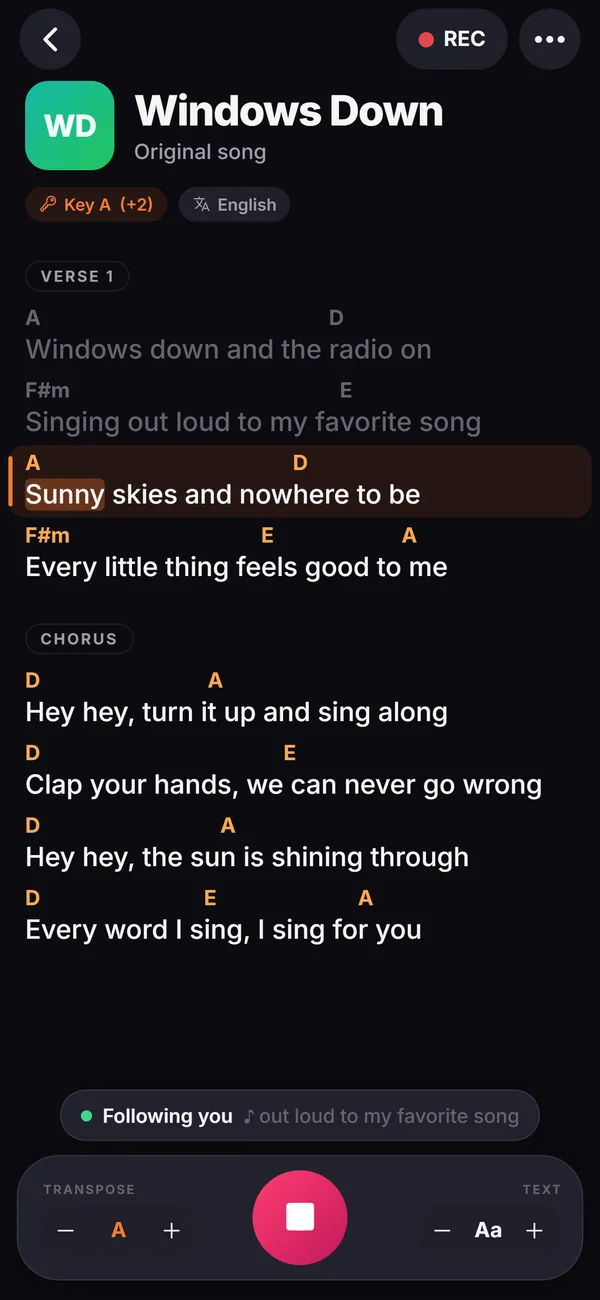
👆 It's live: tap + or − to transpose, or tap any word to jump.
Why karaoke videos let singers down
Karaoke videos are timed to a track. You are not.
Your song has no karaoke version
The song you want to sing tonight isn't in the catalogue, or the only video has the wrong lyrics, the wrong key or an awkward cut.
The words run on a timer
Hold a note, take a breath, add a pause, and the words are already two lines ahead. Slow it down for practice? You can't.
No room for real instruments
Want to sing it with your own guitar or piano, or with friends playing? A video synced to a recording can't follow live music.
Autoscroll guesses. SingScroll listens.
Same song, same singer. Watch what happens on a long held note and a guitar solo.
Karaoke at home in three steps
Add the lyrics
Paste the lyrics of any song, or open a lyrics website in the app's Browse tab or with the Chrome extension. No catalogue to search.
Start your music
Play the instrumental or the original from any music app, a speaker or a live instrument.
Sing
Tap the mic. Each word lights up as you sing it, the next line is always ready, and it finds you again if you skip a verse.
Everything you want from karaoke lyrics
Word-by-word highlight
The word you're singing lights up, karaoke-style, and the next word is highlighted just in time.
Any song, any language
If you can find the lyrics, you can sing it, in any of 29 languages including Hebrew, Arabic and Korean.
Your pace, every time
It follows your voice, not a recording, so practise slowly, hold the high note or improvise. The lyrics wait.
Skips and repeats
Jump to the chorus or sing it twice. SingScroll finds your place within a few words.
Record yourself
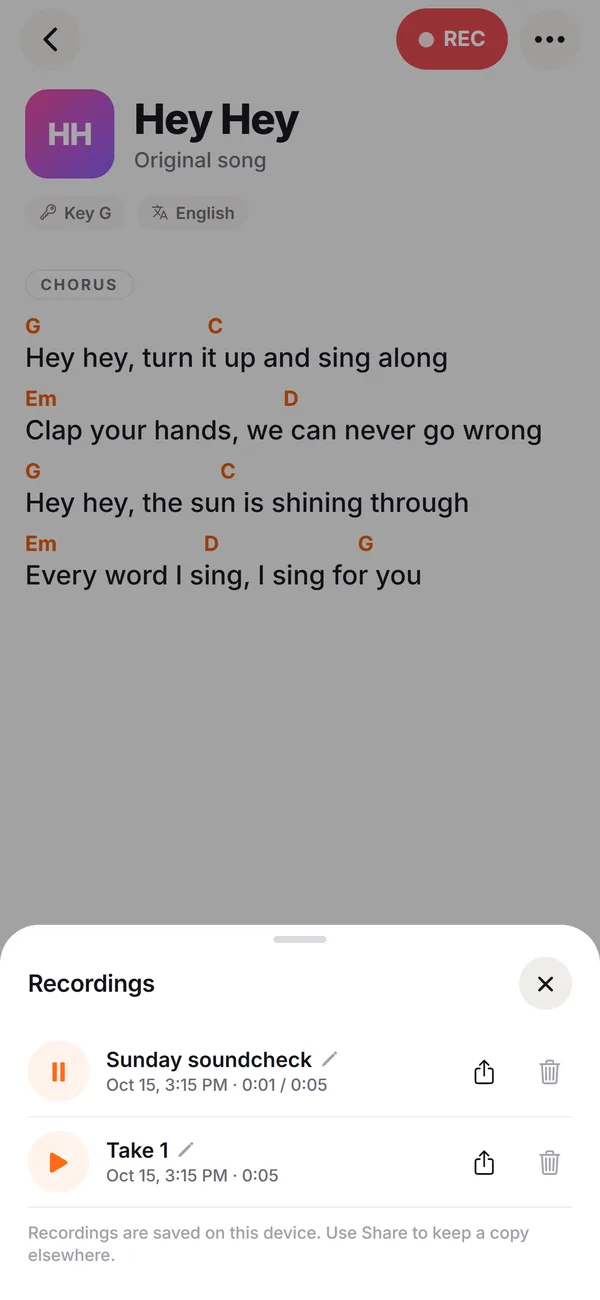
Tap REC to record your performance and listen back on the speaker or earpiece. Rename and share your best takes.
Big and bright
Large text, dark mode and colour themes. On a laptop connected to a TV, the whole room can read along.
What it looks like
Where people sing with SingScroll
Plug the laptop into the TV, play the instrumental from your music app and pass the mic. Everyone can read along at their own pace.
Learn the words of a new song by singing it again and again, slowly at first. The lyrics never rush you.
A friend plays guitar or piano, you sing. SingScroll follows the singer, so live music and a changing tempo are no problem.
Rehearse your song at home, record a take, listen back, and walk in confident.
All of SingScroll, at a glance
Every feature in the app today, on every device.
Singing
- Follows your voice word by word, from any line
- Finds you again after skipped verses and repeated choruses
- Three follow styles: word, line or smooth glide
- Highlights the next word so it feels on time
- Waits during intros, solos and instrumentals
- Tap any word to jump there
- Arrow keys and Bluetooth page-turn pedals step line by line (web and Chrome)
- Screen stays awake while you sing (phone app)
Songs & chords
- Paste any song: chords over words, inline [Am], ChordPro
- Verse, Chorus and Bridge labels recognised
- Song key detected automatically
- Transpose up to 6 semitones each way, in one tap (Pro)
- Hide chords when you only sing
- Understands French chord names too (Do, Ré, Mi)
- 29 languages, Hebrew and Arabic shown right to left
- Text size from small to stage-sized
Set lists & library
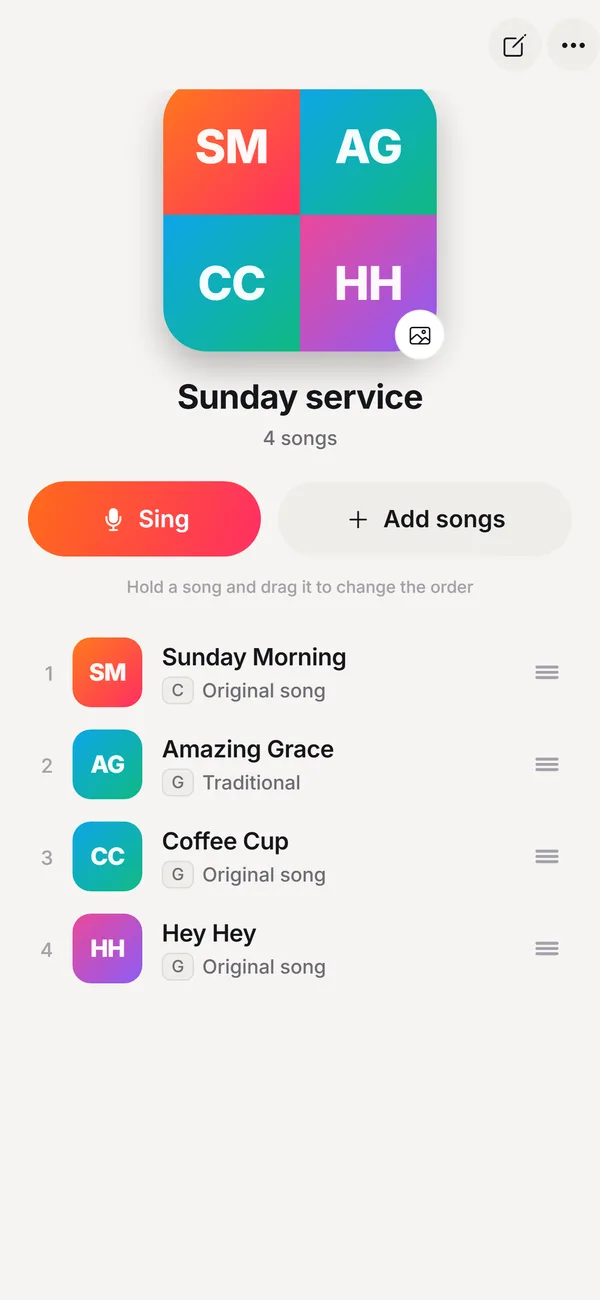
- Playlists for rehearsals, services and gigs
- Drag to reorder, tap Next between songs
- Search your songs and sort by recent, A to Z or artist
- Your own cover photos, or colourful automatic covers
- Jump back in to your latest songs
- A sample song and a 2-minute tutorial to start
Recordings
- Tap REC to record a take while you sing
- Play back with a scrubber, on speaker or earpiece
- Rename, share or delete takes
- Takes stay on your device
Everywhere you sing
- iPhone, iPad and Android apps (coming soon to the stores)
- Web app you can install on Mac and PC, with its own window
- Chrome extension: sing along on any lyrics website, with an Auto scroll mode too
- Built-in browser for 50+ lyrics and chord sites, with Google SafeSearch locked on
- Sign in with Apple, Google or an email code, and your songs sync to all your devices
- Light, dark or automatic, plus 6 colour themes (Pro)
- No ads, no tracking
SingScroll vs the usual karaoke options
| SingScroll | Karaoke videos | Lyrics websites | Memorising | |
|---|---|---|---|---|
| Any song you want | If a version exists | |||
| Moves at your pace | Manual scroll | |||
| Highlights each word | ||||
| Works with live instruments | ||||
| Use any music app or track | ||||
| Ready in a minute |
Karaoke that waits for you
Classic karaoke ties the lyrics to a recording: the words change colour at fixed times, whatever you do. That works if you already know the song and sing it exactly like the original. Most of us don't.
SingScroll turns it around. It uses speech recognition to hear the words you sing and highlights them on screen, so the lyrics move when you move. Sing slower, hold a note, skip to the chorus or repeat it: the highlight stays with you.
SingScroll is a lyrics display, not a music player: it doesn't include songs or backing tracks and it doesn't score your singing. Play the music from wherever you like. Instrumental and karaoke tracks work best, because SingScroll follows the voice it hears.
Start free. Go Pro when you're ready.
No card needed to start. Pro comes with a free trial and you can cancel anytime.
Free
- Voice-following & every follow style
- Chrome extension & built-in browser
- Up to 5 songs & 1 playlist
- Recordings on 5 songs
- Sync across your devices
Pro
- Everything in Free
- Unlimited songs & playlists
- Unlimited recordings
- Transpose to any key
- 6 colour themes
Get SingScroll now. It's free.
Pick your device and start singing in under a minute.
iPhone & iPad
Coming very soon. Until then, open app.singscroll.com in Safari and tap Share, then Add to Home Screen.
Mac & PC
Get the desktop appOpens in Chrome, Edge or Safari. Click Install and SingScroll gets its own window and icon, like any app.
Chrome extension
Add to Chrome, freeSing along on any lyrics or chords website. Press Alt+S on any page.
Questions, answered
Is SingScroll a karaoke app?
It gives you karaoke-style lyrics: each word lights up as you sing it, for any song. It doesn't play backing tracks or include a song catalogue, so you play the music from any app, a speaker or a live instrument.
Can I play music while SingScroll listens?
Yes. On iPhone, your music keeps playing while SingScroll listens. On a computer, play the track from another app or device. Instrumental versions work best, because SingScroll follows the voice it hears, and a recording with vocals can pull it along.
Where do the lyrics come from?
You paste them in, or open a lyrics website in the app's Browse tab or with the Chrome extension and sing right on the page. That way it works for any song, in 29 languages.
Does it score my singing?
No. SingScroll is about following you, not grading you. If you want to hear how you did, tap REC to record a take and listen back.
Can I use it on a TV for a karaoke party?
Yes. Open the web app at app.singscroll.com on a laptop connected to your TV, make the text big and switch to dark mode. Press Space to start and stop listening.
Can I change the key of a song?
If your lyrics include chords, transpose moves every chord in one tap, handy when a friend plays along. Transpose is part of SingScroll Pro.
Is SingScroll free?
Yes. The free plan includes voice-following with every follow style, the Chrome extension and the built-in browser, up to 5 songs, 1 playlist and recordings on 5 songs. SingScroll Pro adds unlimited songs, playlists and recordings, transpose and colour themes for $4.99 a month or $49.99 a year, and starts with a free trial. You can cancel anytime.
Which devices does it work on?
On a computer, use the web app at app.singscroll.com in Chrome, Edge or Safari, or the Chrome extension to sing on any lyrics website. On iPhone, iPad and Android you can use the web app in your browser today; the native apps are coming soon to the App Store and Google Play.
Your karaoke night, at your own pace.
Download SingScroll now. Free to start, no card needed.