Worship lyrics and chords that follow the leader.
Lead with both hands on your guitar or keys. SingScroll listens as you sing and scrolls the lyrics and chord chart for you, even when you repeat the bridge one more time than anyone planned.
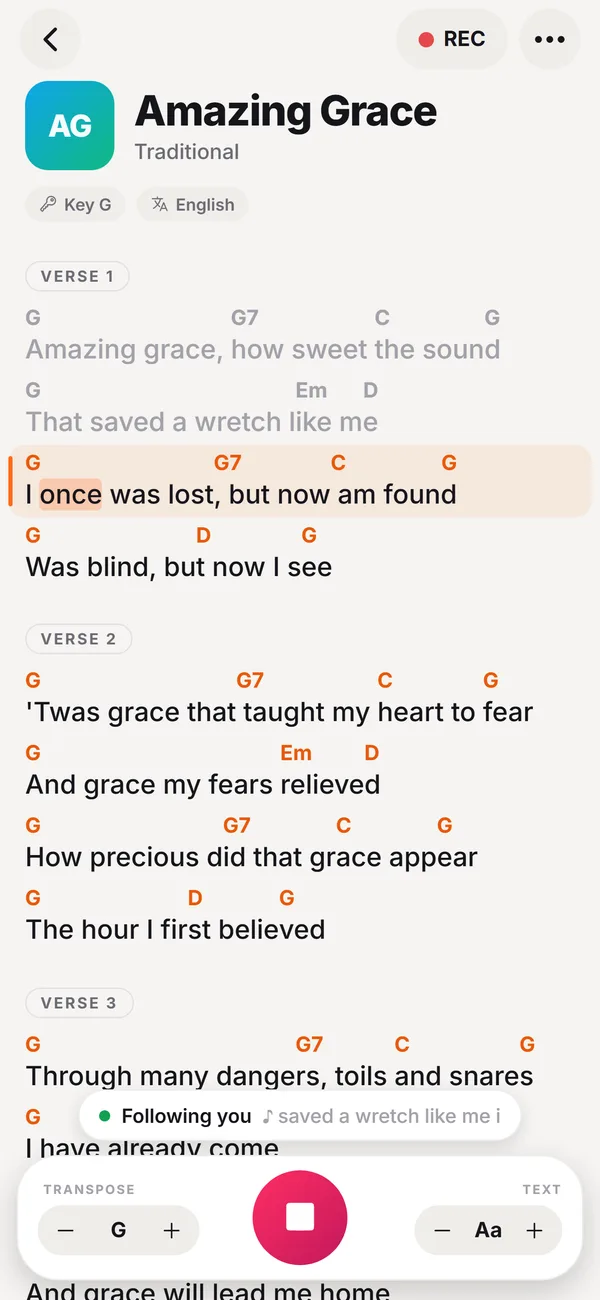
👆 It's live: tap + or − to transpose, or tap any word to jump.
Sunday morning, without the page turns
Worship rarely goes exactly as rehearsed. Your chord chart should keep up with the room, not the other way around.
Repeats nobody planned
Another chorus, a bridge sung four times, a tag at the end. Paper charts and fixed-speed autoscroll can't follow that. Your voice can.
Hands busy, eyes up
No reaching for the iPad between strums or swiping mid-chord. Stay with your band and with the congregation.
Key changes at soundcheck
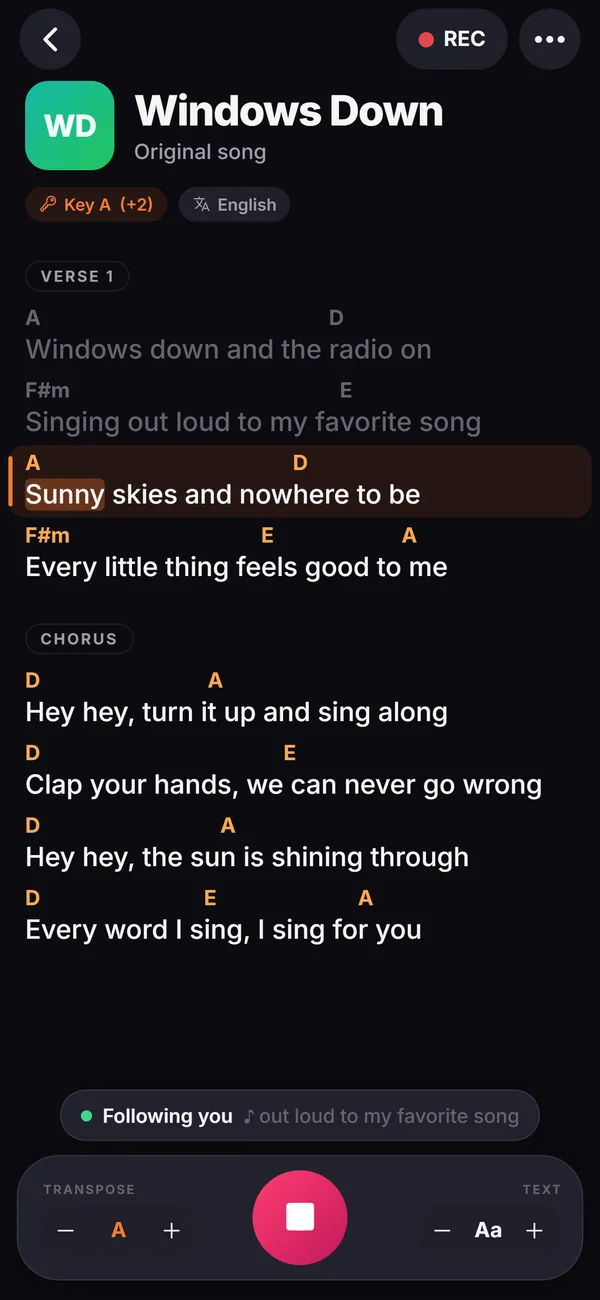
Your vocalist needs it a step lower today? Transpose the whole chart in one tap and every chord follows.
Autoscroll guesses. SingScroll listens.
Same song, same singer. Watch what happens on a long held note and a guitar solo.
Ready for Sunday in three steps
Add your songs
Paste the chord charts your church already uses. SingScroll reads chords above the words or inline like [G], and labels like Verse, Chorus and Bridge.
Build the set list
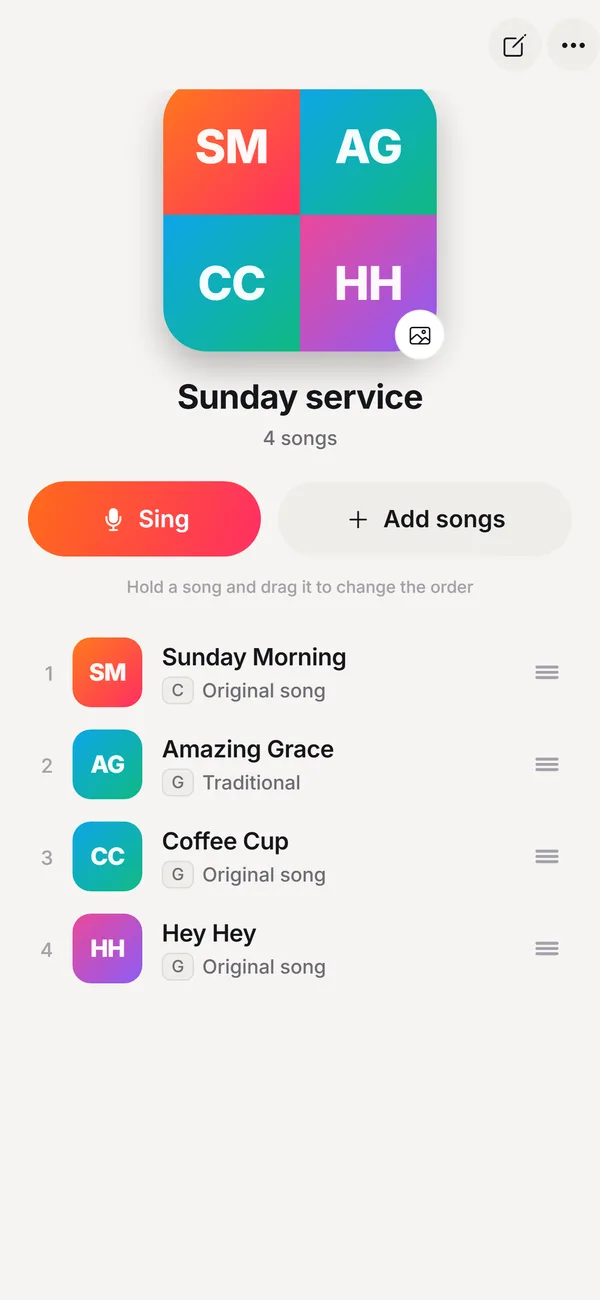
Put Sunday's songs in a playlist, in service order. Drag to reorder when the plan changes on Saturday night.
Lead. It follows.
Tap Sing and start. The line you're singing stays in view, the next line is always ready, the chart finds you again after any repeat, and the screen stays awake.
Built for the way worship actually flows
Follows spontaneous moments
Repeat a chorus, jump back to the bridge or skip verse two. SingScroll finds where you are within a few words.
One-tap transpose
Move the whole song to the right key for whoever leads this week. Capo players can transpose to the shapes they play.
Set lists for every service
A playlist for Sunday morning, another for youth night. When a song ends, one tap on Next opens the following one.
Easy to read on stage
Dark mode for dim sanctuaries, big text, and three follow styles: word by word, line by line or smooth.
Rehearsal takes
Tap REC to capture a run-through and listen back later. Takes stay on your device.
Phone, iPad or laptop
Clip a phone to the mic stand, put an iPad on the music stand or run the web app on the laptop at the keys.
What it looks like
A Sunday with SingScroll
The worship leader adds this week's songs and builds the set: call to worship, two up-tempo songs, a slower song into communion.
Soundcheck. The vocalist asks for the third song a step lower. One tap and the chart is in the new key. REC captures the run-through.
The service starts. The leader sings, SingScroll scrolls. Halfway through, the bridge goes around twice more. The chart stays right with them.
The last chorus ends and SingScroll offers the next song in the set: one tap and the band is into it. Nobody touched a screen mid-song.
All of SingScroll, at a glance
Every feature in the app today, on every device.
Singing
- Follows your voice word by word, from any line
- Finds you again after skipped verses and repeated choruses
- Three follow styles: word, line or smooth glide
- Highlights the next word so it feels on time
- Waits during intros, solos and instrumentals
- Tap any word to jump there
- Arrow keys and Bluetooth page-turn pedals step line by line (web and Chrome)
- Screen stays awake while you sing (phone app)
Songs & chords
- Paste any song: chords over words, inline [Am], ChordPro
- Verse, Chorus and Bridge labels recognised
- Song key detected automatically
- Transpose up to 6 semitones each way, in one tap (Pro)
- Hide chords when you only sing
- Understands French chord names too (Do, Ré, Mi)
- 29 languages, Hebrew and Arabic shown right to left
- Text size from small to stage-sized
Set lists & library
- Playlists for rehearsals, services and gigs
- Drag to reorder, tap Next between songs
- Search your songs and sort by recent, A to Z or artist
- Your own cover photos, or colourful automatic covers
- Jump back in to your latest songs
- A sample song and a 2-minute tutorial to start
Recordings
- Tap REC to record a take while you sing
- Play back with a scrubber, on speaker or earpiece
- Rename, share or delete takes
- Takes stay on your device
Everywhere you sing
- iPhone, iPad and Android apps (coming soon to the stores)
- Web app you can install on Mac and PC, with its own window
- Chrome extension: sing along on any lyrics website, with an Auto scroll mode too
- Built-in browser for 50+ lyrics and chord sites, with Google SafeSearch locked on
- Sign in with Apple, Google or an email code, and your songs sync to all your devices
- Light, dark or automatic, plus 6 colour themes (Pro)
- No ads, no tracking
How SingScroll compares
| SingScroll | Printed charts | PDF + foot pedal | Fixed-speed autoscroll | |
|---|---|---|---|---|
| Hands-free | ||||
| Follows repeats and skipped verses | Manual | Manual | ||
| Transpose instantly | Some apps | |||
| No extra hardware | ||||
| Set lists | Binder | Some apps |
Why voice-following works for worship
Most worship sets are fluid on purpose. The leader reads the room, extends a moment, comes back to a chorus or moves on early. Any tool that scrolls by time, or needs someone to tap a pedal at the right second, ends up a step behind.
SingScroll uses speech recognition to match the words you sing to the words in your chart. Because it follows the lyrics, not a timer, it doesn't matter how slow the ballad is or how many times you repeat the bridge. During an instrumental it simply waits for you.
SingScroll doesn't supply songs. Paste the lyrics and chord charts your church is licensed to use, for example through CCLI SongSelect, or open worship chord websites in the app's Browse tab or with the Chrome extension on a computer.
Start free. Go Pro when you're ready.
No card needed to start. Pro comes with a free trial and you can cancel anytime.
Free
- Voice-following & every follow style
- Chrome extension & built-in browser
- Up to 5 songs & 1 playlist
- Recordings on 5 songs
- Sync across your devices
Pro
- Everything in Free
- Unlimited songs & playlists
- Unlimited recordings
- Transpose to any key
- 6 colour themes
Get SingScroll now. It's free.
Pick your device and start singing in under a minute.
iPhone & iPad
Coming very soon. Until then, open app.singscroll.com in Safari and tap Share, then Add to Home Screen.
Mac & PC
Get the desktop appOpens in Chrome, Edge or Safari. Click Install and SingScroll gets its own window and icon, like any app.
Chrome extension
Add to Chrome, freeSing along on any lyrics or chords website. Press Alt+S on any page.
Questions, answered
Does SingScroll include worship songs?
No. You add your own songs by pasting lyrics and chord charts, so it works with any song your church sings. Use charts you are licensed to use, for example through CCLI SongSelect or the publisher.
Can it follow when we repeat a chorus or bridge?
Yes. SingScroll is tuned for songs where verses and choruses sound almost the same. Repeat a section, skip one or jump back, and it finds you again within a few words. You can also tap any word to jump there.
Will it work with a full band playing?
SingScroll listens to the singer through the device's microphone, so keep the device close to you, on your music stand or mic stand. If it ever loses you in a loud moment, tap the word you're on and it carries on from there.
Can the whole worship team use it?
Yes, each musician runs SingScroll on their own phone, tablet or laptop and it follows the singing near them. With an account, your songs and playlists sync between your own devices. Shared team libraries are not available yet.
Can I change the key for our vocalist?
Yes. Transpose moves every chord in the song in one tap and shows the new key. Transpose is part of SingScroll Pro.
Which languages does it understand?
29 languages, including English, Spanish, French, Portuguese, German, Italian, Hebrew, Arabic, Dutch, Russian, Polish, Turkish, Korean and Hindi. SingScroll detects each song's language automatically, and you can change it per song. Hebrew and Arabic lyrics read right to left, with the chords in place. Depending on the device, some languages need an internet connection.
Is SingScroll free?
Yes. The free plan includes voice-following with every follow style, the Chrome extension and the built-in browser, up to 5 songs, 1 playlist and recordings on 5 songs. SingScroll Pro adds unlimited songs, playlists and recordings, transpose and colour themes for $4.99 a month or $49.99 a year, and starts with a free trial. You can cancel anytime.
Which devices does it work on?
On a computer, use the web app at app.singscroll.com in Chrome, Edge or Safari, or the Chrome extension to sing on any lyrics website. On iPhone, iPad and Android you can use the web app in your browser today; the native apps are coming soon to the App Store and Google Play.
Your next Sunday, hands-free.
Download SingScroll now. Free to start, no card needed.