Sing at the piano. Never turn a page.
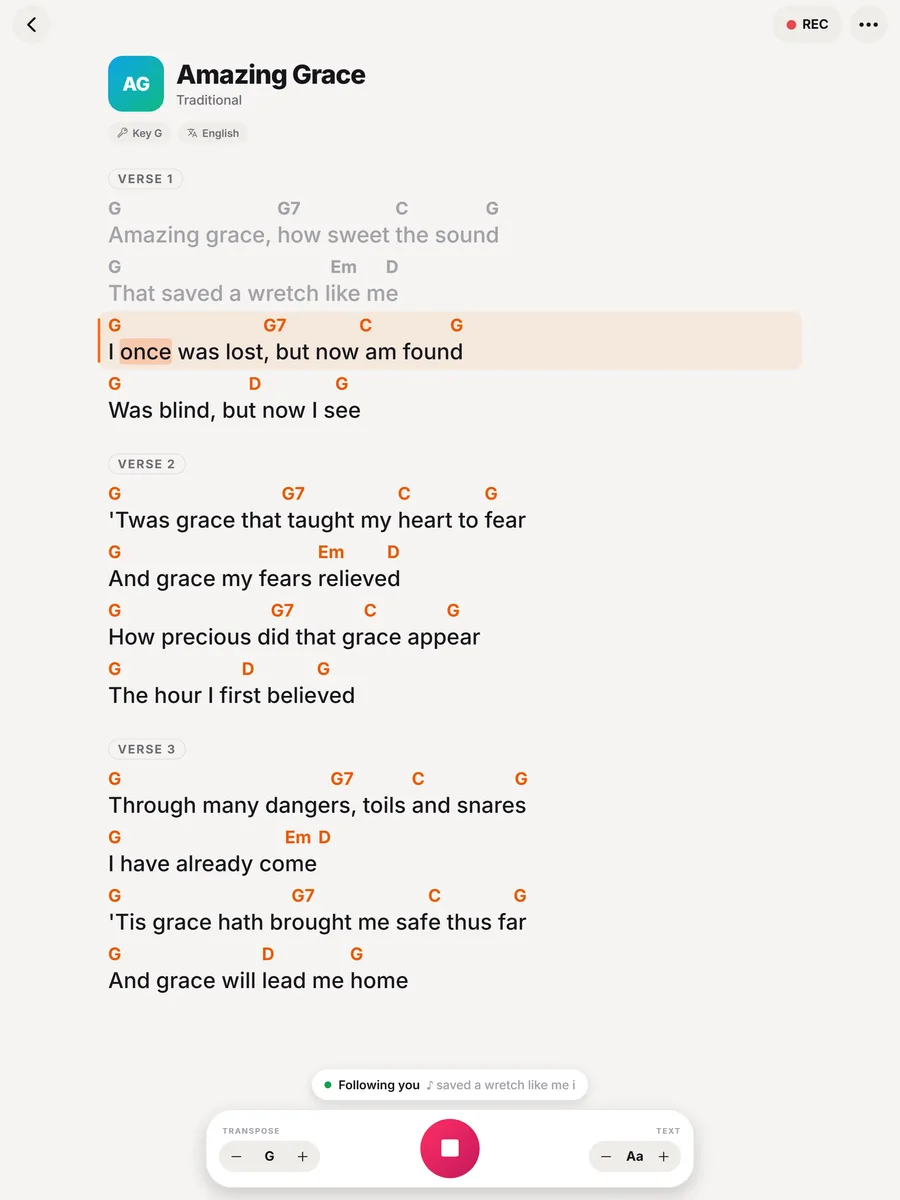
Your left hand has the bass, your right hand has the chords. SingScroll takes care of the page turns: it listens as you sing and scrolls the lyrics and chords on your music stand.
👆 It's live: tap + or − to transpose, or tap any word to jump.
Two hands on the keys, none for the screen
Pianists who sing have it harder than anyone: there is never a free hand to turn the page.
No free hand, ever
Both hands are playing from the first bar to the last. Every page turn is a dropped bass note or a gap in the accompaniment.
Turns in the worst places
The page always ends right before the chorus. A foot pedal helps, until you tap it twice or forget it under the stand.
Lead sheets in the wrong key
Accompanying a different singer tonight? Transposing every chord in your head while singing is a lot to ask.
Autoscroll guesses. SingScroll listens.
Same song, same singer. Watch what happens on a long held note and a guitar solo.
On the music stand in three steps
Add the song
Paste the lyrics and chords, or just the lyrics. SingScroll lays out the chords above the words and labels the sections.
Put it on the stand
Use an iPad or tablet on the music stand, a phone clipped beside the keys, or the web app on a laptop.
Play and sing
Tap the mic, or press Space on a laptop. The current line stays in view while your hands stay on the keys.
Made for the piano bench
Lives on the music stand
A clean, large layout on iPad, tablet or laptop, with adjustable text size you can read from the bench.
Waits through intros
Play a long intro or an interlude and the lyrics hold still. It moves on when you sing.
Transpose for any singer
Accompanying a duet partner or a client? Move the chords to their key in one tap.
Set lists for long nights
Piano bar, wedding cocktail hour or church service: playlists in order, ready to go.
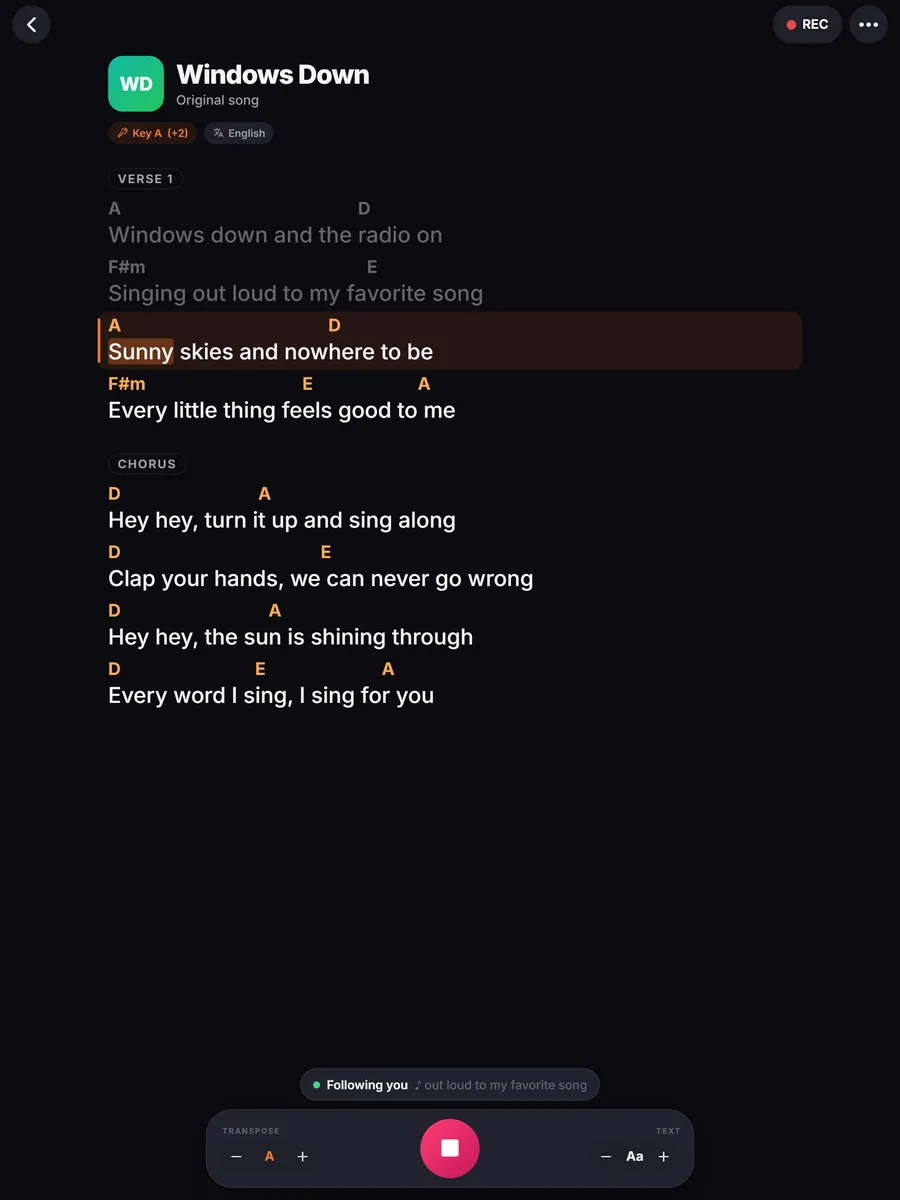
Dark mode for dim rooms
A dark screen that doesn't glare in a lounge, plus colour themes to make it yours.
Space bar and pedals
On a laptop, Space starts and stops listening. The arrow keys or a Bluetooth page-turn pedal step line by line as a backup.
What it looks like
Where pianists use it
A long set of standards and requests, read from a tablet on the stand, without breaking the groove to turn pages.
Set lists for the ceremony and the cocktail hour, in order, in dark mode, with the right keys for the couple's singer.
Lead worship from the piano and let the chart follow the room, repeats and all.
Learn songs at your own pace. When you stop to work out a passage, the lyrics wait on the line you're on.
All of SingScroll, at a glance
Every feature in the app today, on every device.
Singing
- Follows your voice word by word, from any line
- Finds you again after skipped verses and repeated choruses
- Three follow styles: word, line or smooth glide
- Highlights the next word so it feels on time
- Waits during intros, solos and instrumentals
- Tap any word to jump there
- Arrow keys and Bluetooth page-turn pedals step line by line (web and Chrome)
- Screen stays awake while you sing (phone app)
Songs & chords
- Paste any song: chords over words, inline [Am], ChordPro
- Verse, Chorus and Bridge labels recognised
- Song key detected automatically
- Transpose up to 6 semitones each way, in one tap (Pro)
- Hide chords when you only sing
- Understands French chord names too (Do, Ré, Mi)
- 29 languages, Hebrew and Arabic shown right to left
- Text size from small to stage-sized
Set lists & library
- Playlists for rehearsals, services and gigs
- Drag to reorder, tap Next between songs
- Search your songs and sort by recent, A to Z or artist
- Your own cover photos, or colourful automatic covers
- Jump back in to your latest songs
- A sample song and a 2-minute tutorial to start
Recordings
- Tap REC to record a take while you sing
- Play back with a scrubber, on speaker or earpiece
- Rename, share or delete takes
- Takes stay on your device
Everywhere you sing
- iPhone, iPad and Android apps (coming soon to the stores)
- Web app you can install on Mac and PC, with its own window
- Chrome extension: sing along on any lyrics website, with an Auto scroll mode too
- Built-in browser for 50+ lyrics and chord sites, with Google SafeSearch locked on
- Sign in with Apple, Google or an email code, and your songs sync to all your devices
- Light, dark or automatic, plus 6 colour themes (Pro)
- No ads, no tracking
SingScroll vs the music stand classics
| SingScroll | Sheet music binder | PDF reader + pedal | Teleprompter app | |
|---|---|---|---|---|
| Hands-free | ||||
| Follows your tempo | Manual | Manual | ||
| Waits through intros | Manual | |||
| Transpose instantly | ||||
| No extra hardware |
Hands on the keys, eyes on the line
Playing piano and singing at the same time is already two jobs. A page turn adds a third one, and it always lands at a bad moment. SingScroll removes it: it listens to your singing and scrolls the text to keep the line you're on in view.
Because it follows the words and not a timer, rubato, ritardandos and long instrumental passages are no problem. It moves when you sing, so it works for a slow ballad and a fast swing tune alike.
SingScroll shows lyrics with chord symbols, the format most singer-pianists use for pop, jazz standards and worship. It is not a sheet music reader for staff notation.
Start free. Go Pro when you're ready.
No card needed to start. Pro comes with a free trial and you can cancel anytime.
Free
- Voice-following & every follow style
- Chrome extension & built-in browser
- Up to 5 songs & 1 playlist
- Recordings on 5 songs
- Sync across your devices
Pro
- Everything in Free
- Unlimited songs & playlists
- Unlimited recordings
- Transpose to any key
- 6 colour themes
Get SingScroll now. It's free.
Pick your device and start singing in under a minute.
iPhone & iPad
Coming very soon. Until then, open app.singscroll.com in Safari and tap Share, then Add to Home Screen.
Mac & PC
Get the desktop appOpens in Chrome, Edge or Safari. Click Install and SingScroll gets its own window and icon, like any app.
Chrome extension
Add to Chrome, freeSing along on any lyrics or chords website. Press Alt+S on any page.
Questions, answered
Can I use a page-turn pedal too?
Yes. In the web app and the Chrome extension, a Bluetooth pedal that sends arrow or Page Up / Page Down keys steps line by line, handy as a backup.
Does it work on iPad?
Yes. Open the web app at app.singscroll.com in Safari or Chrome on your iPad today. The native iPhone and iPad app is coming soon to the App Store.
Can it show sheet music?
SingScroll shows lyrics with chord symbols above the words, not staff notation. It's made for lead-sheet style playing: pop, jazz standards, worship and singer-songwriter material.
Will the piano confuse it?
SingScroll listens for the words you sing, so the piano between phrases doesn't move it. Place the device on the music stand, close to you. If it ever loses you, tap the word you're on.
Can I use it on a laptop next to my keyboard?
Yes. Open app.singscroll.com in Chrome, Edge or Safari and install it like software. Press Space to start and stop listening.
Can I transpose for a different singer?
Yes. Transpose changes every chord in the song in one tap and shows the new key. Transpose is part of SingScroll Pro.
How fast can I add a song for a request?
Paste the lyrics, with or without chords, and start singing. Or find the song on a lyrics site and follow it right there with the app's Browse tab or the Chrome extension.
Is SingScroll free?
Yes. The free plan includes voice-following with every follow style, the Chrome extension and the built-in browser, up to 5 songs, 1 playlist and recordings on 5 songs. SingScroll Pro adds unlimited songs, playlists and recordings, transpose and colour themes for $4.99 a month or $49.99 a year, and starts with a free trial. You can cancel anytime.
Which languages does it understand?
29 languages, including English, Spanish, French, Portuguese, German, Italian, Hebrew, Arabic, Dutch, Russian, Polish, Turkish, Korean and Hindi. SingScroll detects each song's language automatically, and you can change it per song. Hebrew and Arabic lyrics read right to left, with the chords in place. Depending on the device, some languages need an internet connection.
Your next song, both hands on the keys.
Download SingScroll now. Free to start, no card needed.